2012/07/14

Near space photography, high-altitude balloons and the Earth's atmosphere

I have recently decided to get involved in a hobby called Near Space Photography, which is very closely related to High-altitude ballooning. This hobby consists in being able to take photographs of the Earth as seen from the Near Space, usually (if not always) using an high-altitude balloon. When the balloon reaches its maximum altitude, it is possible to take pictures of the black canopy of space, and viewing clearly a big swath of the earth with a curved horizon out to several hundred Km's. Before explaining where it is located the Near Space, let me briefly present the Earth's Atmosphere which encompasses a set of main layers as follows (the description bellow regarding the atmosphere and its layers was adapted from the 'Atmosphere of Earth' entry in Wikipedia, together with other sources):

Atmosphere layers
(@Public Domain,
not to scale)

Atmosphere
The atmosphere of Earth is a layer of gases surrounding the planet Earth that is retained by Earth's gravity. An altitude of 120 km is where atmospheric effects become noticeable during atmospheric re-entry of spacecrafts. The Kármán line, at 100 km, also is often regarded as the boundary between atmosphere and outer space. The atmosphere protects life on Earth by absorbing ultraviolet solar radiation, warming the surface through heat retention (greenhouse effect), and reducing temperature extremes between day and night (the diurnal temperature variation).
Atmospheric stratification describes the structure of the atmosphere, dividing it into distinct layers, each with specific characteristics such as temperature or composition. The atmosphere has a mass of about 5×10¹⁸ kg, three quarters of which is within about 11 km of the surface. The atmosphere becomes thinner and thinner with increasing altitude, with no definite boundary between the atmosphere and outer space. 
Air is the name given to atmosphere used in breathing and photosynthesis.


Exosphere
The exosphere is named from the ancient Greek "ἔξω éxō" meaning outside, external, beyond. The outermost layer of Earth's atmosphere extends from the exobase upward. It is mainly composed of hydrogen and helium. The particles are so far apart that they can travel hundreds of kilometers without colliding with one another. Since the particles rarely collide, the atmosphere no longer behaves like a fluid. These free-moving particles follow ballistic trajectories and may migrate into and out of the magnetosphere or the solar wind.

Thermosphere
Temperature increases with height in the thermosphere from the mesopause up to the thermopause, then is constant with height. This is why this layer  is named from the Greek "θερμός" (thermos) meaning heat. Unlike in the stratosphere, where the temperature rise is caused by absorption of radiation by ozone, in the thermosphere the temperature rise is a result of the extremely low density of molecules. The temperature of this layer can rise to 1,500 °C (2,700 °F), though the gas molecules are so far apart that temperature in the usual sense is not well defined. The International Space Station has a stable orbit within the middle of the thermosphere, between 320 and 380 kilometres. Auroras also occur in the  thermosphere . The top of the thermosphere, called the exobase, varies in height with solar activity and ranges from about 350–800 km.

Mesosphere
The mesosphere is named from the Greek word mesos (middle). This is related with the fact that together the stratosphere, mesosphere and lowest part of the thermosphere are collectively referred to as the "middle atmosphere", which spans heights from approximately 10 to 100 km. The mesosphere extends from the stratopause to 80–85 km. It is the layer where most meteors burn up upon entering the atmosphere. Temperature decreases with height in the mesosphere. The upper boundary of the mesosphere is the mesopause, which can be the coldest naturally occurring place on Earth with temperatures of 190 K (−83 °C).

Stratosphere
The stratosphere extends from the tropopause to about 51 km. Temperature increases with height due to increased absorption of ultraviolet radiation by the ozone layer, which restricts turbulence and mixing. The ozone layer is mainly located in the lower portion of the stratosphere from approximately 20 to 30 kilometres (12 to 19 mi) above Earth, though the thickness varies seasonally and geographically. The ozone layer absorbs 97–99% of the Sun's medium-frequency ultraviolet light (from about 200 nm to 315 nm wavelength), which potentially damages exposed life forms on Earth. While the temperature may be −60 °C at the tropopause, the top of the stratosphere is much warmer, and may be near freezing, in fact, the top of the stratosphere has a temperature of about −3°C (270 K), just slightly below the freezing point of water. The stratopause, which is the boundary between the stratosphere and mesosphere, typically is at 50 to 55 km. The pressure here is 1/1000 of the pressure at sea level.

Troposphere
The troposphere begins at the surface and extends to between 7 km at the poles and 20 km at the tropics. It contains approximately 80% of the atmosphere's mass and 99% of its water vapor and aerosols. The troposphere is mostly heated by transfer of energy from the surface, so on average the lowest part of the troposphere is warmest and temperature decreases with altitude. This promotes vertical mixing (hence the origin of its name in the Greek word "τροπή", trope, meaning turn or overturn. The lowest part of the troposphere, where friction with the Earth's surface influences air flow, is the planetary boundary layer. This layer is typically a few hundred meters to 2 km deep depending on the landform and time of day. The tropopause is the boundary between the troposphere and stratosphere and is a temperature inversion. In the tropopause it can be found the main jet streams which are fast flowing, narrow air currents with wind velocities that can go from 92 km/h to 398 km/h, typically from West to the East. The northern hemisphere polar jet flows over the middle to northern latitudes of North America, Europe, and Asia and their intervening oceans, while the southern hemisphere polar jet mostly circles Antarctica all year round. This phenomena is not so typical over the Portugal latitude, so it should not affect a balloon launched from there. While air content and atmospheric pressure vary at different layers, air suitable for the survival of terrestrial plants and terrestrial animals is currently only known to be found in Earth's troposphere and artificial atmospheres. Most of the phenomena we associate with day-to-day weather occur in the troposphere.

In order to better illustrate the differences between the atmosphere layers and also because this will be useful for a next Post where I will present the physics and maths applied to a weather balloon, the figure that follows show how the air density, pressure and temperature change as the altitude increases and the several atmosphere layers are traversed.

Comparison of the 1962 US Standard Atmosphere graph of
geometric altitude against air density, pressure, the speed of
sound and temperature with approximate altitudes of
various objects (@GNU Free Documentation License)

Regarding this figure I would like to highlight the following. From the Earth surface, the air density and pressure drops consistently up-to between 30 to 40km of altitude when both reach 0. Regarding the temperature things are more complex. The temperature in the Troposphere drops a lot from 290 kelvin to a bit less than 220 kelvin. Then in the stratosphere the temperature initially, and during almost 10 km, maintains constant, but then it raises from 220 kelvin to 270 kelvin. Then in the Mesosphere it drops again. An analysis of the temperature profile in the Atmosphere reveal that the temperature is in fact a good metric to distinguish among atmospheric layers, because:

  • We know that the general pattern of the temperature profile with altitude is constant;
  • The temperature profile pattern changes coincide with changes in the atmospheric layer- the temperature stops dropping when we reach the end of the Troposphere (called the Tropopause) and starts increasing in the Stratosphere up-to its limit (the Statopause) when it is maintained constant for a while until we enter in the Mesosphere where a drop of the temperature occurs.
In any case the discussion regarding the air density, pressure and temperature patterns with altitude is only included in this Post because this characterisation is relevant for the next post where I explain intuitively how a weather (gas) balloon works and is able to go up into the atmosphere.

Getting back to the Near Space, different (not many) definitions exist about it, but to be honest I do not know to which point the Near Space is a formal, standard concept, or if it is just a more informal concept created to designate a given region in the atmosphere. The typical references state that the Near Space refer to an area of the Earth's atmosphere between 20 to 100 km above the sea level, encompassing the stratosphere, mesosphere, and thermosphere. The Near Space is an area of Earth's atmosphere where there is very little air, but where the remaining amount generates far too much drag for satellites to remain in orbit. A vehicle designed to operate in the Near Space is sometimes called nearcraft, and there are two types of vehicles that usually operate in the Near Space, these include sub-orbital rockets, which make quick jumps into and out of near space, and high-altitude balloons. Regarding the high-altitude balloons, which are those of interest to us in what respects Near Space photography, the most common type is the weather balloon (or sounding balloon) which may reach altitudes of 40 km (25 miles) or more, limited by diminishing pressures causing the balloon to expand to such a degree that it disintegrates. So  these balloons are released into de Near Space and in particular into the Stratosphere.
There are references to other types of high-altitude balloons, Scientific balloons, that can remain at high altitudes for several days, but usually an high-altitude balloon is released form Earth's surface and then rises up to an altitude where it bursts and falls back into the surface, all this in some hours time. But in 2012 I think it is already possible to speak about a third type of high-altitude balloon, because in the last years there have been some many launches of this type in different parts of the world, which could be referred by hobby balloon, Near Space photography balloon or amateur balloon. These category of high-altitude balloons differ from the weather or scientific balloons in its mission which in this case is hobby-related, taking pictures, personal technological achievement, or just for fun, but in fact all  have in common (weather and scientific balloon included) that the balloon payload is carried in both cases by a weather balloon.

Now to recap, the Near Space photography hobby aims to send to the Near Space, in particular, to the Stratosphere,  a payload carried by a weather (gas) balloon which ultimately aims to take photographs of the Earth at different altitudes. Of course taking pictures is many times just one of the features of the payload, because many other things are, and can be done, in addition to taking photos, namely measuring atmospheric parameters like temperature, pressure and wind, and many other possible experiments and measures (ozone, CO2, other).

Before finalising this post it is important to refer that high-altitude balloons are usually filled either with helium or hydrogen. The helium is more expensive than hydrogen, but is also less explosive, and so, due to the latter, today the majority of balloons, especially the hobby-related amateur ones are filled in with helium. This will certainly be my choice, but caution must be taken because also with helium things can go wrong.

2012/05/25

PMBOK - Knowledge Areas versus Project Management Process Groups

The PMBOK recognises that Project management is "the application of knowledge, skills, tools, and techniques to project activities to meet project requirements". And for this application of knowledge the PMBOK requires the effective management of a set of processes.
A process is "a set of interrelated actions and activities performed to achieve a pre-specified product, result, or service" and is characterized by a set of inputs, tools and techniques and outputs.

Now... The PMBOK groups the processes mentioned above in two distinct ways (categories):
  • Project Management Process Groups;
  • Knowledge Areas.   
The Project Management Process Groups can be seen (but they are not) as a project phase. The project phases, and in this case, the Project Management Process Groups, are typically completed sequentially, even though any experienced project manager knows that usually some (sometimes much) overlap do exist, and it is meant to exist.
Knowledge areas are areas of related knowledge, for instance, the 'Develop schedule' and the 'Control schedule' processes are different processes belong to the same 'Time' knowledge area.

Project Management Process Groups
The PMBOK groups the project management processes into five Project Management Process Groups (or just Process Groups), that in reality are five categories that can be seen (with care) also as phases of the project.
  • Initiating Process Group - all processes performed to define a new project or a new phase of the project;
  • Planning Process Group - all processes performed to establish the scope of the project, refine the objectives, and to establish a set of actions that allow to obtain the objectives that the project is required to; 
  • Executing Process Group - all processes performed to implement the work that was defined in the project management plan;
  • Monitoring and Controlling Process Group - all processes performed to track, review and regulate the progress of the performance of the project; all processes that identify and initiate necessary changes to the plan;
  • Closing Process Group -  all processes performed to close all activities of the PMBOK processes with the goal to close the project or phase.
From the text in the 'Initiating' and 'Closing' process groups you can understand why I say that the process groups can be seen as a project phase but they are not a project phase: You can apply the 5 categories of processes (Process Groups) to a whole project, meaning, that you first perform the 'Initiating' processes of the project, then the 'Planning' processes, then the 'Executing', the 'Monitoring and Controlling' and finally the 'Closing' processes on the project, and voilà, you have the project completed. But you can also apply this full process (from 'Initiating' to 'Closing') to a given phase of the project. In this case imagine a very complex software project where you want to apply to the design phase of the software project the complete PMBOK methodology. In this case the design of this software project would be managed as a project.

Knowledge Areas
Additionally to gouping  the project management processes into process groups, the PMBOK also groups the same processes into what is called the Knowledge Areas. Knowledge areas are categories    where all processes share a common theme. For instance, the processes 'Plan quality', 'Perform quality assurance', and 'Perform quality control' all belong to the same knowledge area of 'Project Quality Management', even though all belong to different process groups, the first to 'Planning', the second to 'Executing' and the last to 'Monitoring & Control'.

The table  (based on the table available in section 3.2, page 43, of the PMBOK, 4th Edition) bellow shows all the PMBOK processes together with the mapping of the Project Management Process Groups and the Knowledge Areas.

Process Groups
Knowledge Area
Initiating
Planning
Executing
Monitoring & Controlling
Closing
Integration
-  Develop project charter
-  Develop project management plan
-  Direct and manage project execution
-  Monitor and control project work
-  Perform integrated change control
-  Close project or phase
Scope

-  Collect requirements
-  Define scope
-  Create WBS

-  Verify scope
-  Control scope

Time

-  Define activities
-  Sequence activities
-  Estimate activity resources
-  Estimate activity durations
-  Develop schedule

-  Control schedule

Cost

-  Estimate costs
-  Determine budget

-  Control costs

Quality

-  Plan quality
-  Perform quality assurance
-  Perform quality control

Human Resources

-  Develop human resource plan
-  Acquire project team
-  Develop project team
-  Manage project team


Communications
-  Identify stakeholders
-  Plan communications
-  Distribute information
-  Manage stakeholder expectations
-  Report performance

Risk

-  Plan risk management
-  Identify risks
-  Perform qualitative risk analysis
-  Perform quantitative risk analysis
-  Plan risk responses

-  Monitor and control risks

Procurement

-  Plan requirements
-  Conduct procurements
-  Administer procurements
-  Close procurements

This is key to understanding the PMBOK and study it. Because many people when starting to read this Guide quickly give up because of a lack of understanding on how the information is organised in the PMBOK. 
The PMBOK is organised by chapters where each chapter (with some exceptions, for instance, in the initial chapters) present a new Knowledge Area. Then inside each chapter the processes belonging to the Knowledge Area are presented one by one. This means that who reads the PMBOK end-to-end do not see a presentation of each process by the order of its execution in a given project or phase, but grouped in a thematic area. For instance, in section 7 it is presented the 'Project Cost Management' knowledge area that presents in sequence the 'Estimate Costs', the 'Determine Budget' and the 'Control Costs' processes. The first two should be implemented in the Planning 'phase' of the project whereas the last in conducted in the Monitoring and Control 'phase'. The result is that if you read the PMBOK sequentially you keep jumping on the natural order of execution of the project management tasks.
But if you understood the above, and the table that is here presented, you should be fine just by reading the PMBOK.

Simple way to add a table to a blog with HTML capability

I have been trying to find an easy way to add a table to a blog, in my case, to the Google Blogger (this Blog)... I have seen many solutions, but the one that I prefer is the following:


  1. Implement the table in Microsoft Word;
  2. Go to the 'Save As' screen and in the combo box 'Save as type' select 'Web Page (*.htm; *.html)';
  3. Then open the saved document with any text editor like the windows Notepad, WordPad, EditPlus or other (depending on your operating system);
  4. Finally search the html beginning tag for the table (<table) and the corresponding closing tag (</table>), cutting that text and pasting it into the blog (not forgetting to do this in a blog message which accepts HTML).

Certification on Project Management

There are several different certification programmes available for Project Managers. Most notably we have the  Project Management Professional (PMP) certification, sponsored by the (American) Project Management Institute (PMI), and whose foundational reference is the Guide to the Project Management Body of Knowledge (PMBOK Guide), and the certification in PRINCE2 (PRojects IN Controlled Environments 2)  which is endorsed by the UK government as the project management standard for public projects.
Having several years of practical experience in Project management, I feel now the urge to study, practice and ultimately get the certification on the above two mentioned methods. The main driver is  to consolidate  my personal project management practices and to facilitate the communication with my peers and Clients.
It must be noticed that the practices prescribed by the certifications above are independent of the business area where you work, meaning that you can apply them to software, hardware, to build a plain or to build a house.
  
After a first and quick analysis I selected the PMBOK as the first standard to study, especially due to the fact that it is more comprehensive than the PRINCE2 alternative. In following posts I will share some of the results of my study.

2012/03/13

Calculating the bearing between two points

Sometimes it is necessary to calculate the angle (bearing) between two points. This is very important for applications like Gaming but also for the implementation of Particle Filters that I will be talking in latter posts.
For a visual intuition on the problem see the figure bellow.

So imagine that you want to calculate the bearing between the origin (0,0) of the above figure and one of four points:

  • Quadrant I of the figure - point (1,1) 
  • Quadrant II of the figure - point (1,-1)  
  • Quadrant III of the figure - point (-1,-1)  
  • Quadrant IV of the figure - point (1,-1)

By remembering the trigonometry classes on right triangles, we know that a angle O can be given by the arc tangent (atan) of the division between the opposite side and the adjacent side of the angle O. Now the question is that in computer languages the function 'atan', that provides the arctangent function, cannot distinguish the quadrant of the angle. It has only 1 parameter.
So, in Python you have the have the function math.atan(x) which returns a value in radians. In this case, and looking to the above figure, the 'atan' to both the points (-1,1) and (1,-1) will have to be calculated by atan(-1) which provides as result -π/4. So, some sort of correction must be performed in order to have the result in a standard angle from 0 to 2π. In order to correct this, we must know in which quadrant we are because depending on that a different value must be added, as follows:

  • Quadrant I (no need for corrections): O= atan(opposite/adjacent)
  • Quadrant II and III: O= atan(opposite/adjacent) + π 
  • Quadrant IV: O= atan(opposite/adjacent) + 2π

But fortunately there is a easier and better way. Using the atan2 function, available in the majority of the programming languages.  In Python you have the have the function math.atan2(y,x) which returns a value in radians between -π  and  π. The point of atan2 is that the signs of both inputs are known to it, so it can compute the correct quadrant for the angle. In this function just be aware of the following:

  • the first parameter is y and not x as usually
  • if you want a value between 0 and  2π you should apply to the result of atan2 the modulus of  2π, as shown in the above figure

You can find in this link some more information on this and on other trigonometry functions. And regarding Python look in here.

2012/02/28

How to get the type of an object in Python

Sometimes we need to know the type of an object in Python. For instance, when you get an object from a method and you just don't know anymore if its a list, a dict, or other, how can you know the type of the object? To solve this, you can use either the type(object) or object.__class__ commands, like it is demonstrated bellow.
d1={1:'airplane', 2:'car'}
d2= ['airplane', 'car']
print type(d1)
print d1.__class__
print type(d2)
print d2.__class__
Results in:

<type 'dict'>
<type 'dict'>
<type 'list'>
<type 'list'>

2012/02/23

Linear Algebra in Python with numpy - getting ready to Machine Learning implementation

In this post I will present how it can be handled Linear Algebra in Python to implement Machine Learning algorithms. This will be important not only to represent the 'X' matrix and 'y' vector as the input and output, respectively, of the algorithms, but also to perform the vectorized implementation of the algorithms which turn out to present much more performance than the iterative alternatives.
For this we shall use the numpy Python library, particularly, its version 1.6.1.

Both for the representation of matrices and vectors we shall use the numpy array object which allow us to perform all needed operations. It follows a set of examples that cover all (I hope) the operations we may need to do perform in the implementation of Machine Learning algorithms in Python.

So firstly we must import the library:
>>> from numpy import *

By importing the library this way there is no need to use the prefix np when referring to a numpy object like array.

So then we create some matrices and a vector and print them to the screen:
>>> # Matrix M1 3x3 (3 rows, 3 columns)
>>> M1= array([[1,0,5],[2,5,3],[6,2,8]])
>>> print M1
[[1 0 5]
 [2 5 3]
 [6 2 8]]

>>> # Matrix M2 3x3 (3 rows, 3 columns)
>>> M2= array([[4,0,2],[2,5,8],[2,4,1]])
>>> print M2
[[4 0 2]
 [2 5 8]
 [2 4 1]]

>>> # Matrix M3 2x3 (2 rows, 3 colums)
>>> M3= array([[1,3,2],[4,0,1]])
>>> print M3
[[1 3 2]
 [4 0 1]]

>>> # Matrix M4 3x2 (3 rows, 2 colums)
>>> M4= array([[1,3],[0,1],[5,2]])
>>> print M4
[[1 3]
 [0 1]
 [5 2]]

>>> # Vector 1x3 (3-dimensional vector)
>>> v= array([[2,5,4]])
>>> print v
[[2 5 4]]

>>> # Transpose of the vector to convert it from a horizontal to a vertical vector
>>> v= v.transpose()
>>> print v
[[2]
 [5]
 [4]]

Notice that in line 29 we define the vector as a matrix of 1 row (getting an horizontal vector). This is necessary because the transpose only works well in an matrix. If we defined v as we define u bellow (notice that bellow we have only one'[' instead of two '[[' we would not be able to apply the transpose and get a vertical vector):
>>> u= array([2,5,4])
>>> print u
[2 5 4]

>>> print u.transpose()
[2 5 4]
And how can we create a matrix or a vector initializing all elements to 0?
>>> # Matrix (3 rows, 4 column) of float 0's
>>> print zeros((3,4))
[[ 0.  0.  0.  0.]
 [ 0.  0.  0.  0.]
 [ 0.  0.  0.  0.]]
>>> # Vector (6 rows, 1 column) of float 0's
>>> print zeros((6,1))
[[ 0.]
 [ 0.]
 [ 0.]
 [ 0.]
 [ 0.]
 [ 0.]]
And to 1?
>>> # Matrix (4 rows, 3 column) of float 1's
>>> print ones((4,3))
[[ 1.  1.  1.]
 [ 1.  1.  1.]
 [ 1.  1.  1.]
 [ 1.  1.  1.]]
>>> # Vector (1 row, 6 columns) of float 1's
>>> print ones((1,6))
[[ 1.  1.  1.  1.  1.  1.]]
Now that we have some matrices and a vector let's perform some operations on them:
>>> # Size of the matrix
>>> print "size:", M1.shape, "nr. of rows:", M1.shape[0], "nr. of columns:", M1.shape[1]
size: (3, 3) nr. of rows: 3 nr. of columns: 3

>>> # Access cells of a matrix 
>>> print "element in 1st row and 1st column of M1:", M1[0,0]
element in 1st row and 1st column of M1: 1
Now let's add two matrices which results in a new matrix where each element is the result of adding the correspondent elements in the original matrices. Both added matrices must have the same size (rows and columns):
>>> # Matrix addition
>>> print M1+M2
[[ 5  0  7]
 [ 4 10 11]
 [ 8  6  9]]
And now let's multiply a scalar and a matrix. The result is a matrix with the same dimension (rows and columns) where each cell is multiplied by the scalar:
>>> # Scalar multiplication
>>> print 3*M1
[[ 3  0 15]
 [ 6 15  9]
 [18  6 24]]
It follows the multiplication of a vector by a matrix. If we multiply A (nrOfRows-A, nrOfCols-A) and B (nrOfRows-B,nrOfCols-B), and without worring which is a vector and which is a matrix, the multiplication is only possible when, nrOfCols-A == nrOfRows-B. The result of the multiplication is a matrix with size (nrOfRows-A,nrOfCols-B)
>>> # Multiplication of a matrix with a vector
>>> print dot(M1,v)
[[22]
 [41]
 [54]]
To explain how the multiplication above works, see bellow:
$$\begin{bmatrix}
1&0&5\\
2&5&3\\
6&2&8
\end{bmatrix}*\begin{bmatrix}
2\\
5\\
4
\end{bmatrix}=\begin{bmatrix}
1*2+0*5+5*4\\
2*2+5*5+3*4\\
6*2+2*5+8*4
\end{bmatrix}=\begin{bmatrix}
22\\
41\\
54
\end{bmatrix}$$
It is also possible to multiply two vectors. What we get as a result depends on the dimensions of the multiplied vectors. If we multiply a 1 by 3 vector by a 3 by 1 vector we get a 1 by 1 matrix (which we can easily convert to a scalar) obtained by multiplying corresponding entries and then summing those products. If we multiply a 3 by 1 vector by a 1 by 3 vector we get a 3 by 3 matrix obtained by multiplying each cell in the first vector by each cell in the correspondent row of the second vector. Bellow we show two examples by multiplying a vector by its transpose.
>>> # Vector multiplication
>>> print dot(v.transpose(), v)
[[45]]
>>> print dot(v.transpose(), v)[0][0]
45
>>> print dot(v, v.transpose())
[[ 4 10  8]
 [10 25 20]
 [ 8 20 16]]
And now we will multiply two matrices. This is the general case of the above cases, and so, to multiply two matrices we need that the number of columns of the first matrix be equal to the number of rows of the second matrix. And as above the result shall be a matrix with size (nrOfRows-A,nrOfCols-B)
>>> # Matrix multiplication
>>> print dot(M3, M4)
[[11 10]
 [ 9 14]]
To create a Identity matrix is also pretty straightforward:
>>> # Identity matrix of 3*3
>>> print eye(3)
[[ 1.  0.  0.]
 [ 0.  1.  0.]
 [ 0.  0.  1.]]
As it can be seen bellow, any matrix multiplied by the identity results in that same matrix. M1 must be a square matrix (same nr of rows and columns). If you remember from above M1 is a 3x3 square matrix:
>>>print "Checking identity: M1xI"
Checking identity: M1xI
>>>print dot(M1, eye(3))
[[ 1.  0.  5.]
 [ 2.  5.  3.]
 [ 6.  2.  8.]]
>>>print "Checking identity: IxM1"
Checking identity: IxM1
>>>print dot(eye(3), M1)
[[ 1.  0.  5.]
 [ 2.  5.  3.]
 [ 6.  2.  8.]]
Now let's see how to get the inverse of a matrix. By definition matrix*(inverse(matrix)) == (inverse(matrix))*matrix == identity. Also be aware that not all matrices have inverse... the rule of thumb is that matrices that are near to 0 may not have inverse.
>>> # Inverse of M1
>>> print linalg.inv(M1)
[[-0.35416667 -0.10416667  0.26041667]
 [-0.02083333  0.22916667 -0.07291667]
 [ 0.27083333  0.02083333 -0.05208333]]
>>> # Inverse of M1 multiplied by M1 - which results in the identity matrix
>>> print dot(linalg.inv(M1), M1)
[[  1.00000000e+00   0.00000000e+00   0.00000000e+00]
 [  0.00000000e+00   1.00000000e+00  -1.11022302e-16]
 [  5.55111512e-17   1.38777878e-17   1.00000000e+00]]
>>> # M1 multiplied by inverse of M1 - which results in the identity matrix
>>> print dot(M1, linalg.inv(M1))
[[  1.00000000e+00   0.00000000e+00   0.00000000e+00]
 [  0.00000000e+00   1.00000000e+00  -8.32667268e-17]
 [  0.00000000e+00   2.77555756e-17   1.00000000e+00]]
We have seen above for the case of a vector, but in any case, see in the following how you can get the transpose of a matrix.
>>> # Matrix transpose
>>> print M1.transpose()
[[1 2 6]
 [0 5 2]
 [5 3 8]]
>>> print M3.transpose()
[[1 4]
 [3 0]
 [2 1]]
And how can we get the maximum value present in a given matrix or vector and how can we do this by row or column of a matrix
>>> # Maximum value of all cells of a matrix
>>> print M1.max()
8
>>> print M2.max()
8
>>> print M3.max()
4
>>> print M4.max()
5
>>> # Maximum value of all cells of a vector
>>> print v.max()
5
>>> # Maximum value of each column of a matrix
>>> print M1.max(0)
[6 5 8]
>>> # Maximum value of each row of a matrix
>>> print M1.max(1)
[5 5 8]
Other task important to Machine Learning is to be able to concatenate. Bellow you can find some examples of it.
>>> # CONCATENATE rows of M1 with rows of M2 
>>> print concatenate((M1,M2))
[[1 0 5]
 [2 5 3]
 [6 2 8]
 [4 0 2]
 [2 5 8]
 [2 4 1]]
>>> # CONCATENATE columns of M1 with columns of M2
>>> print concatenate((M1,M2),1)
[[1 0 5 4 0 2]
 [2 5 3 2 5 8]
 [6 2 8 2 4 1]]
>>> # CONCATENATE a vector with a matrix
>>> print concatenate((v,M1),1)
[[2 1 0 5]
 [5 2 5 3]
 [4 6 2 8]]

2012/02/21

Machine learning - linear regression - part I - theory overview


Imagine that you have a data set composed by x and y values, where y is conditioned by x. A simple, and not so interesting example, could be if you have a data set where y= 2 * x:

(x,y)
(1,2)
(2,4)
(3,6)
(4,8)

Now the challenge is: if you just provide to the computer the data set of (x,y) pair values, but not the formula that these values follow, how can you teach the computer to automatically learn the relation between 'x' and 'y' so that when a 'x' value is provided to the computer he is able to automatically predict the correspondent 'y' value. This can be achieved by supervised Machine Learning algorithms like linear regression, logistic regression, neural networks and others. In a supervised learning problem we provide to the algorithm a training data set containing several examples and for each example we say what is the value of 'y' for a given 'x'.

In this post I'll present the linear regression algorithm which is a machine supervised learning algorithm. Here the regression term is used because the “answer” for each example is not discrete, but more like real-valued outputs.

As stated before the supervised learning algorithms that we will refer to will be: linear regression, logistic regression and neural networks. But for each there are some common terms and concepts that will briefly presented bellow:

Data set
Set of (x,y) tuples, where each tuple is called an example. E.g.:

(1,2)
(2,4)
(3,6)
(4,8)

Training data set:
Data set which is used for training purposes by a supervised machine learning algorithm.


Input "variables" / features
These are the input values of each example on the data set. It can be a single value 'x'  or several 'x' values. In the latter case they are named x1, x2, …, xn . The input "variables" are also called features.

Output "variable" / Target "variable"
This is the output value of each example on the data set. It can also be called target "variable"


m= number of training examples (in the example above m = 4)
n= number of features (in the example above n = 1 because we have only 1 x variable per example)

(x,y)= one specific example

(x(i),y(i))= training example in the row i - ith row of the training set
If follows a block diagram explaining how the supervised learning algorithms work:


We provide a training set to the learning algorithm that will then compute an hypothesis function ‘h’ that given a new (x1, x2, …, xn) feature will estimate the 'y' value. So the hypothesis ‘h’ is a function that maps between x’s and y’s.


Hypothesis for the linear regression with multiple variables able also called linear regression with multiple features also called multivariate linear regression.


$$h_{\theta}(x)= \theta_{0}+\theta_{1}x_{1}+\theta_{2}x_{2}+...+\theta_{n}x_{n}$$
$$\theta_{i's}= parameters$$


For convenience of notation we define $$x_{0}=1$$ for all training examples $$(x_{0}^{i}= 1)$$

We can then have, for each training example, the variables/features and the parameter's represent by vectors. One vector containing the variables/features and other vector containing the parameter's:

$$\begin{bmatrix} x_{0}\\ x_{1}\\ x_{2}\\ ...\\ x_{n}\\ \end{bmatrix} \epsilon \mathbb{R}^{n+1} \begin{bmatrix} \theta_{0}\\ \theta_{1}\\ \theta_{2}\\ ...\\ \theta_{n}\\ \end{bmatrix} \epsilon \mathbb{R}^{n+1}$$

We can re-write the hypothesis function as:
$$(1)h_{\theta}(x)=\theta_{0}x_{0}+\theta_{1}x_{1}+\theta_{2}x_{2}+...+\theta_{n}x_{n}=\sum_{j=0}^{n}\theta_{j}x_{j}$$  (as x0 = 1  this equation is similar to the above). Another way to write this equation is through linear algebra with vector multiplication: $$h_{\theta}(x)= \theta^{T}x$$ which is equivalent to:
$$(2) h_{\theta}(x)=\begin{bmatrix} \theta_{0}&\theta_{1}&\theta_{2}&...\theta_{n} \end{bmatrix} \begin{bmatrix} x_{0}\\ x_{1}\\ x_{2}\\ ...\\ x_{n}\\ \end{bmatrix}$$
If you don't know why the equation (1) and (2) represent exactly the same, you probably need a refreshment on Linear Algebra, to which I recommend you to visit the Khan Academy and search the Linear Algebra video tutorials.


So the learning algorithms goal is to learn the values of the parameters θ that make the hypothesis function ‘h’ best fit the training data, that is, the learning algorithms will choose the values for θ0, θ1, θ2, ..., θn so that hθ(x) is close to 'y' for our training examples (x,y).

So what we want is to minimise the difference between the estimated output hθ(x) and the real output ‘y’, for all examples in the training set, by varying the parameters θ0, θ1, θ2, ..., θn . So we want to minimise the error, or as usually done for regression problems, we want to minimise the squared error:

$$Cost function= J(\theta)= \frac{1}{2m}\sum_{i=1}^{m}(h_{\theta}(x^{(i)})-y^{(i)})^{2}$$$$Objective= \underset{\theta}{minimise} J(\theta)$$

So what the expression above means is: find me the values of θ0, θ1, θ2, ..., θn so that the squared error cost function is minimised. The multiplication term 1/2m is used only for mathematical convenience.
In order to minimise the cost function we shall use an algorithm called gradient descent that is able to minimise arbitrary functions.
Gradient descent
  1. Start with some θ0, θ1, θ2, ..., θn (vector θ) - a common choice is starting with θ0=0, θ1=0, θ2=0, ..., θn= 0
  2. Change θ0, θ1, θ2, ..., θn until we minimise the function J
Gradient descent algorithm

repeat until convergence {
$$\theta_{j}=\theta_{j}-\alpha\frac{\partial}{\partial\theta_{j}}J(\theta)(for j=0, j=1, j=2, ..., j=n)$$
}


The α is a positive number called the learning rate and controls how big are the steps of changing θ0, θ1, θ2, ..., θn. If α is too small, gradient descent can be slow. If α is too large, gradient descent can overshoot the minimum. It may fail to converge, or even diverge.
In order to implement this algorithm it is necessary to update  θ0, θ1, θ2, ..., θn simultaneously. First the updated values for all j (for j=0, j=1, … j=n) are calculated:
$$temp0= \theta_{0}-\alpha\frac{\partial}{\partial\theta_{0}}J(\theta)$$
$$temp1= \theta_{1}-\alpha\frac{\partial}{\partial\theta_{1}}J(\theta)$$
$$temp2= \theta_{2}-\alpha\frac{\partial}{\partial\theta_{2}}J(\theta)$$
$$...$$
$$tempn= \theta_{n}-\alpha\frac{\partial}{\partial\theta_{n}}J(\theta)$$
and only after all values are calculated you can update the values of θj:


θ0= temp0
θ1= temp1
θ2= temp2
θn= tempn

If after calculating temp0 we immediately updated θ0, then when calculating temp1 we would be using the updated value of  θ0 for the derivative of the cost function (remember that the cost function includes all values of (θ)). That would be incorrect.


The gradient descent finds local optimum (minimum) and stays there.

Gradient descent algorithm with the derivative terms solved

repeat until convergence {
$$\theta_{j}=\theta_{j}-\alpha\frac{\partial}{\partial\theta_{j}}J(\theta)=\theta_{j}-\alpha\frac{1}{m}\sum_{i=1}^{m}(h_{\theta}(x^{(i)})-y^{(i)})x_{j}^{(i)}(for j=0, j=1, j=2, ..., j=n)$$
}


The cost function for linear regression will always be a “bowl” shaped function, or better put, a convex function. And this type of function does not have local optimum, only global optimum, which implies that the gradient descent applied to linear regression cost functions guarantees that the global minimum is always reached.
Feature scaling The idea here is to make all features (x1,x2,x3, ...) to be on a similar scale, that is, all features being on a similar range of values. The consequence is, as it can be proved mathematically, that the gradient descent will converge quicker. The goal is to have: $$-1\leq x_{i}\leq 1$$ Feature scaling with mean normalization
When doing feature scaling sometimes it is also performed mean normalization. Here the strategy is to make the features to have approximately zero mean by replacing  xi by xi - μi (this should not be applied to x0):
$$x_{i}=\frac{x_{i}-\mu_{i}}{S_{i}}$$, where:
  • μi= average value of  xi in the training set
  • Si= range of values of xi (meaning the maximum value - minimum value); or it can also be used the standard deviation of xi .
This strategy will result in approximately: $$-0.5\leq x_{i}\leq 0.5$$
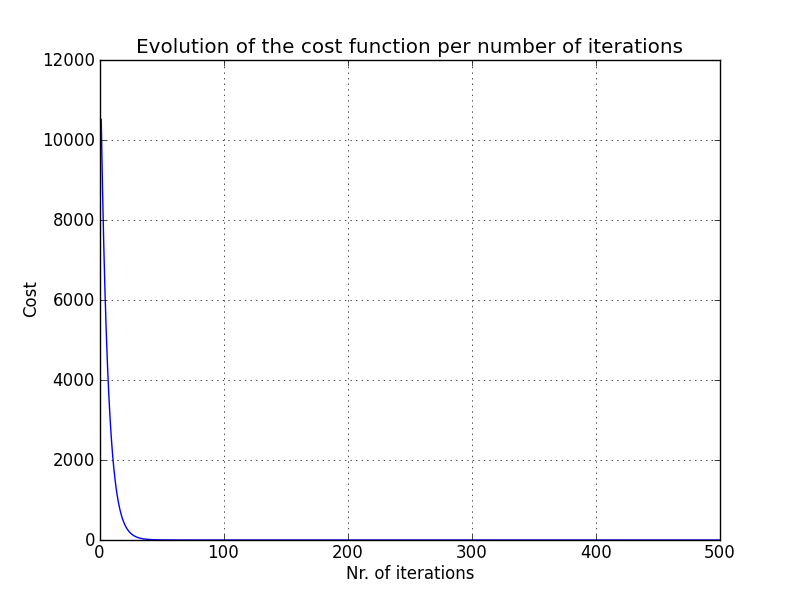
    By applying feature scaling we can make gradient descent run much faster and converge in lot fewer iterations. When should the gradient descent algorithm be stopped? Manually: a plot should be done by having in the x-axis the number of iterations of the gradient descent algorithm and in the y-axis the cost:

    The cost must always decrease after each iteration.


    Automatically: it is possible to have an automatic convergence test - declare convergence if the cost J(θ) decreases by less than a small value ε (e.g.: 10-3) in one iteration - as it may be difficult to choose the value of ε, many times is better to plot the cost function has explained above.


    Learning rate - α 


    The cost function J(θ) should decrease after each iteration of gradient descent, but if it doesn’t, two things may be happening:

    • there is a bug in the code - correct it
    • the learning rate α is too high - decrease α
    For a α which is small enough, gradient descent should always decrease, but if α is too small, gradient descent can be slow to converge.
    To choose α we can try consecutively different values of α until we are satisfied with the result of the cost function: 0.001, 0.003 (=0.001 * 3), 0.01, 0.03, 01, 0.3.